ShopDreamUp AI ArtDreamUp
Deviation Actions


Suggested Deviants


Suggested Collections


You Might Like…


Featured in Groups





Description
as you may know
shit take long
and after the first poor and lazy try of a papercraft tutorial
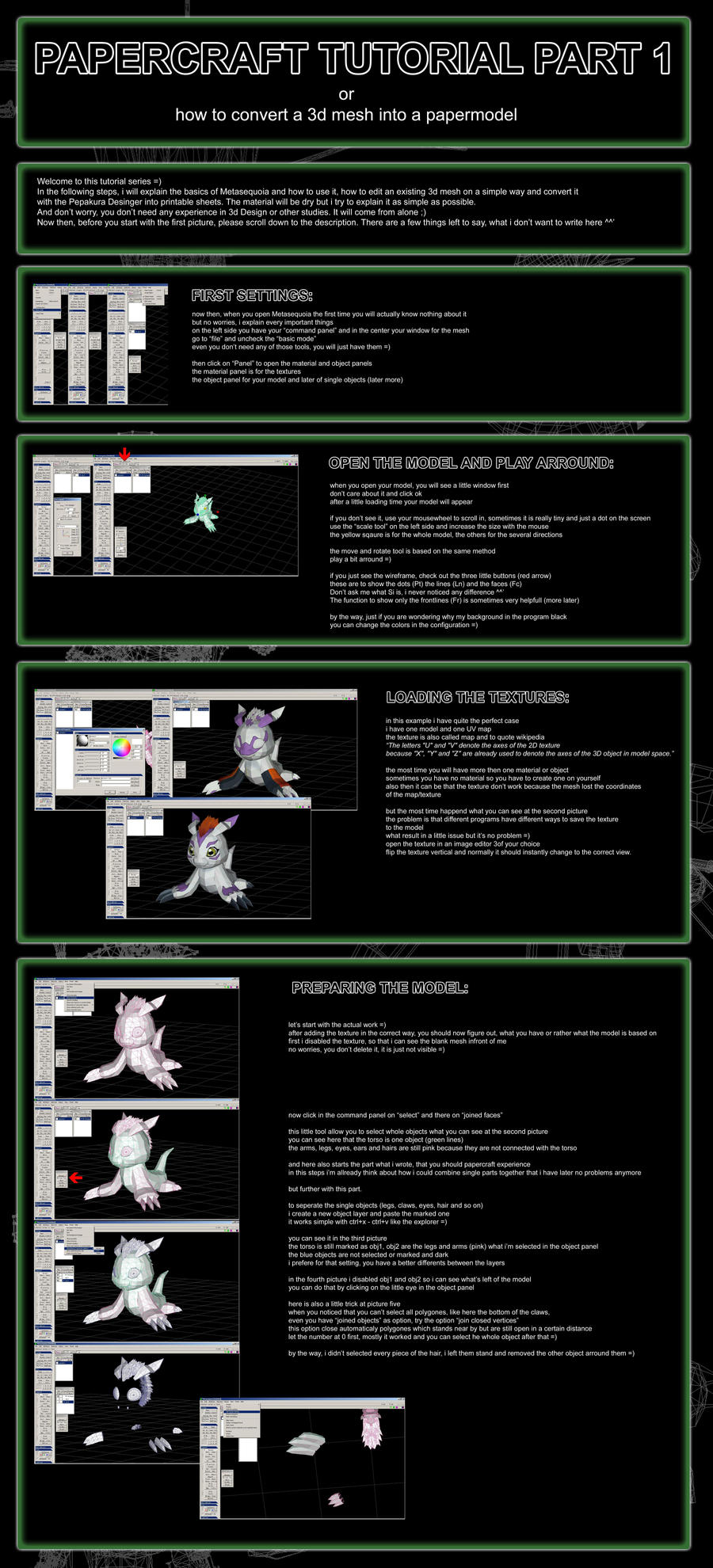
i'm proudly present the second better version, where i'm gonna explain every single step what i do when i'm build a papermodel out of a 3d mesh
after meanwhile three years of papercrafting i still can say, it is one of the best hobbys i've ever had and with this little series i wanna show you
that it is not that hard as it looks
but also that there is much more work behind as you may know
About the Tutorial:
This tutorial is ground basic
specially the first part, where i am explaining the first steps in Metasequoia
what means, it counts for beginner and also professional 3d desinger
the only thing what you should have is some knowledge in papercrafting
where you start
what is possible to build
and what not
for this tutorial i'm using Metasequoia, a great freeware 3d editor what you can download "here"
if you are allready using an other programm like 3dsmax, Lightwave or Blender, you can of course use one of these
it doesn't matter because the method is the same
i also use Photoshop but every other image editor should do the same
the only thing what you have to purchase is the "Pepakura Desinger"
because only the Viewer is free
About the 3d models:
there are a lot of model sources out there
google is your best friend here
but i will NOT explain how to receive or where you can download 3d game models
that is not the meaning of this tutorial and here starts also the illegal part
why?
to recieve 3d meshes out of games, you have mostly break or rip them and you can imagine, the most developer don't really pleased by that
but as i said, google is your best friend here
ok then, enough talking
let's start with the first picture where Metasequoia is allready installed
Tutorial Overview:


shit take long
and after the first poor and lazy try of a papercraft tutorial
i'm proudly present the second better version, where i'm gonna explain every single step what i do when i'm build a papermodel out of a 3d mesh
after meanwhile three years of papercrafting i still can say, it is one of the best hobbys i've ever had and with this little series i wanna show you
that it is not that hard as it looks
but also that there is much more work behind as you may know
About the Tutorial:
This tutorial is ground basic
specially the first part, where i am explaining the first steps in Metasequoia
what means, it counts for beginner and also professional 3d desinger
the only thing what you should have is some knowledge in papercrafting
where you start
what is possible to build
and what not
for this tutorial i'm using Metasequoia, a great freeware 3d editor what you can download "here"
if you are allready using an other programm like 3dsmax, Lightwave or Blender, you can of course use one of these
it doesn't matter because the method is the same
i also use Photoshop but every other image editor should do the same
the only thing what you have to purchase is the "Pepakura Desinger"
because only the Viewer is free
About the 3d models:
there are a lot of model sources out there
google is your best friend here
but i will NOT explain how to receive or where you can download 3d game models
that is not the meaning of this tutorial and here starts also the illegal part
why?
to recieve 3d meshes out of games, you have mostly break or rip them and you can imagine, the most developer don't really pleased by that
but as i said, google is your best friend here
ok then, enough talking
let's start with the first picture where Metasequoia is allready installed
Tutorial Overview:
Image size
5000x11000px 4.23 MB
© 2012 - 2024 Destro2k
Comments5
Join the community to add your comment. Already a deviant? Log In

Thanks for taking the time much appreciated dear sir.